
Inhaltsverzeichnis
- The problem: why manual contact management fails
- The numbers behind the chaos
- The Swiss reality
- The 4 methods compared
- Method 1: business cards and a notebook
- Method 2: Excel or Google Sheets
- Method 3: Outlook or Google Contacts
- Method 4: CRM system
- 5 signs your current method is no longer enough
- 1. Contacts live in multiple places
- 2. Follow-ups slip through
- 3. Coverage during absences is hard
- 4. You delete old contacts to make room
- 5. You can’t answer simple questions
- The switch: from Excel to CRM in 4 steps
- Contact management and data protection in Switzerland
- Frequently asked questions
Managing contacts means capturing, maintaining, and making accessible — across the whole team — your business contact data: names, companies, phone numbers, emails, and conversation notes.
22.5% of all B2B contact data goes stale every year. That isn’t a theoretical problem — it’s your customers moving house, changing jobs, or getting new email addresses. According to the Bureau of Labor Statistics, 15–20% of working professionals change roles each year. And yet 40% of sales reps still manage their customer data in Excel or Outlook — no automatic updates, no shared access. For the full process of moving to a professional system, see our German guide on CRM rollout (also available in German only).
Das Wichtigste in Kürze
- Data ages faster than you'd think: According to Dun & Bradstreet, you lose 22.5% of your contact data every year to job changes, moves, and email updates. After two years, nearly half of your database is stale.
- The tool has to match the team: Solo → Outlook is fine. 2–3 people → a structured spreadsheet. From 5 people or 100+ contacts → a CRM. The right choice saves hours every week.
- Contact management is just the start: A CRM connects contacts to emails, calls, and opportunities automatically. According to CRM.org, teams save 5–10 hours a week of manual work that way.
This article compares the four most common ways of managing contacts — from business cards through Excel and Outlook to CRM — and shows when the switch to a professional system pays off.
The problem: why manual contact management fails
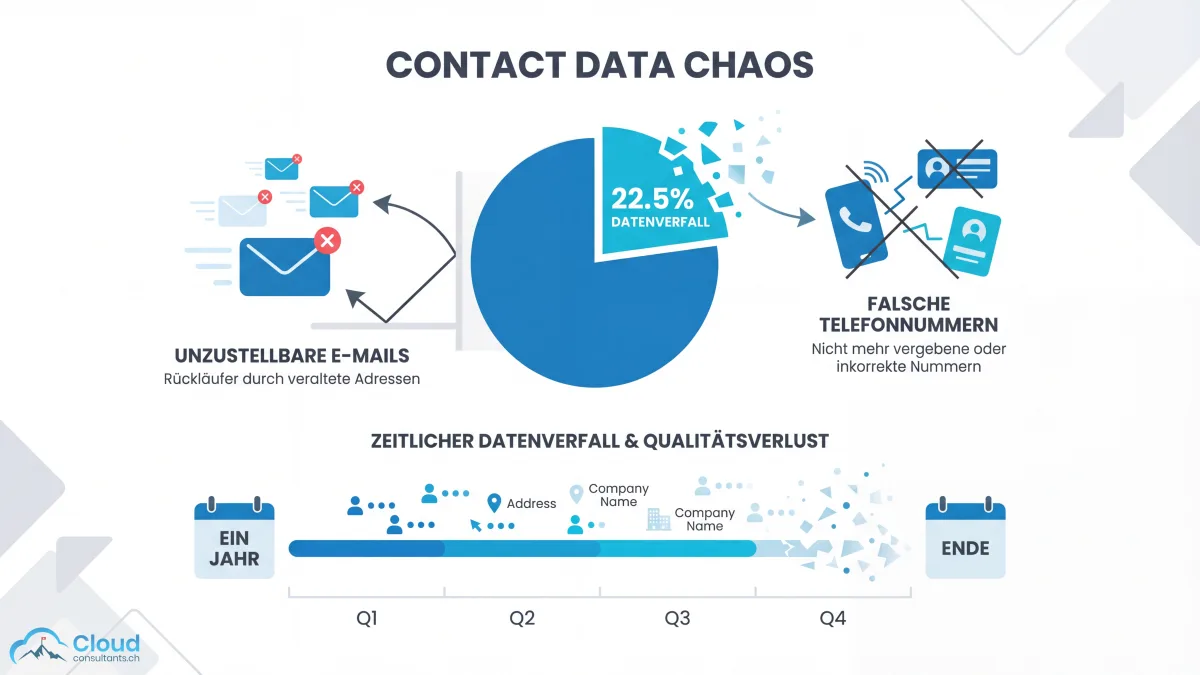
Most SMBs start with what they know: business cards in a drawer, contacts in Outlook, an Excel sheet for the most important customers. It works — until it doesn’t.
The numbers behind the chaos
- 22.5% data decay per year: According to the Dun & Bradstreet B2B Data Benchmark Report (2025), nearly a quarter of all business contact data goes stale every year. Emails bounce, phone numbers no longer work, primary contacts have moved on.
- 5.5 hours per week on data maintenance: According to Keepsync (2025), sales reps spend an average of 5.5 hours per week on manual data entry and contact lookups — that’s over 280 hours per year.
- 88% of business cards end up in the bin: Industry surveys show the vast majority of collected business cards are tossed within a week — along with the contact details and the conversation notes on the back.
The Swiss reality
The situation in Switzerland is particularly stark: according to the localsearch/HSLU SMB study (2025), only 3% of Swiss SMBs fully meet their customers’ digital expectations — even though 77% of the Swiss population want to find and book SMB services online. 64% of Swiss micro-businesses don’t even have a website. For many SMBs, professional contact management is still an unfamiliar concept.
The 4 methods compared
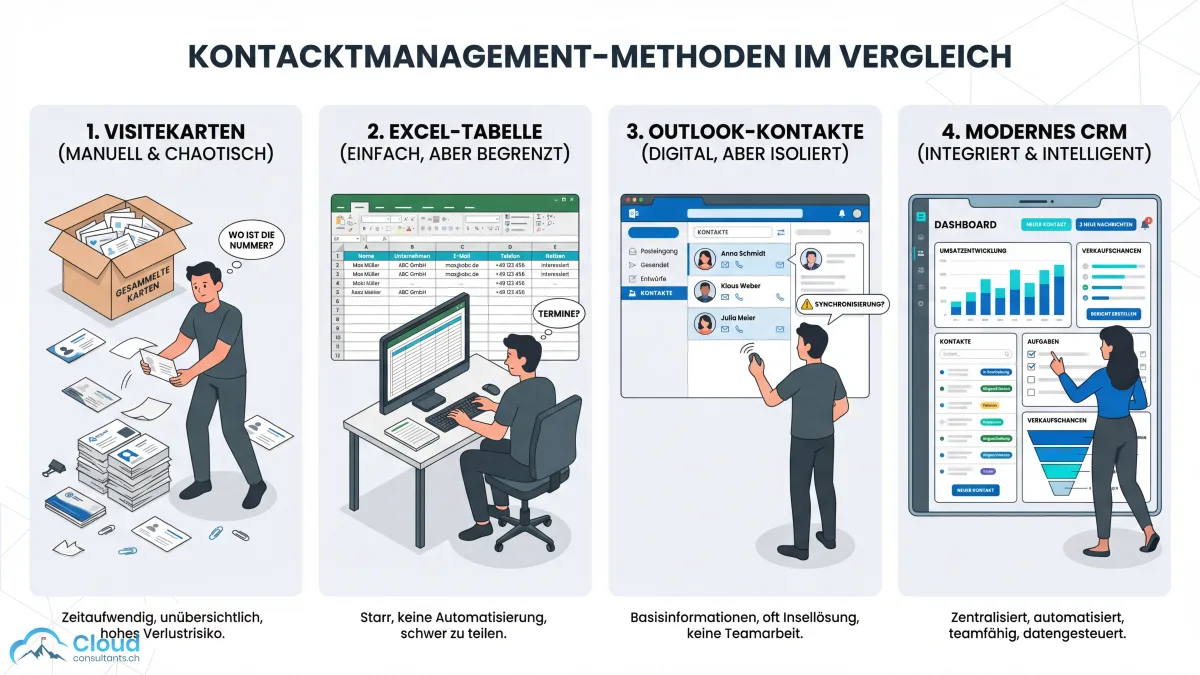
| Method | Cost | Team access | Automation | Max. workable contacts |
|---|---|---|---|---|
| Business cards / notebook | 0 CHF | No | None | ~50 |
| Excel / Google Sheets | 0 CHF | Limited | None | ~500 |
| Outlook / Google Contacts | 0–12 CHF/mo | Limited | Minimal | ~1,000 |
| CRM system | 0–25+ CHF/user/mo | Yes, fully | Comprehensive | Unlimited |
Method 1: business cards and a notebook
Who it’s enough for: solo professionals with fewer than 50 active contacts they personally maintain.
Why it breaks: no backup, no search, no team access. If you fall ill or lose the notebook, the contacts are gone. And by the third trade fair with 80 fresh business cards, the system becomes the bottleneck.
Method 2: Excel or Google Sheets
Who it’s enough for: small teams (1–2 people) with up to 500 contacts and simple needs — an address list, phone numbers, maybe a notes column.
Why it breaks: there’s no link between contact and communication. You know Ms. Müller works at Meier AG — but not who last called her, what offer is still open, or when the next follow-up is due. More on this in our article Customer management with Excel — where spreadsheets hit the ceiling.
Method 3: Outlook or Google Contacts
Who it’s enough for: individuals or very small teams who mostly manage email contacts and don’t need to model a sales process.
Why it breaks: Outlook contacts are tied to a mailbox. Shared access requires shared mailboxes or Exchange configurations. There’s no pipeline, no task management, and no reporting. If you need more, the next step is a proper customer database.
Method 4: CRM system
Who it’s the right choice for: teams from 2–3 people with shared customer contacts, sales processes, or a need for automation and reporting.
What a CRM does differently: it automatically connects contacts to emails, calls, meetings, offers, and tasks. Everyone on the team sees the current status — without having to ask. Automatic reminders prevent follow-ups from slipping. Dashboards show how many deals are in the pipeline and where they’re stuck.
91% of companies with more than 10 employees already use a CRM. For companies with fewer than 10 employees, that drops to 50%. The gap is closing — slowly.
If you want to test a CRM with no licence cost, our German-language comparison of free CRM systems covers the best options.
5 signs your current method is no longer enough
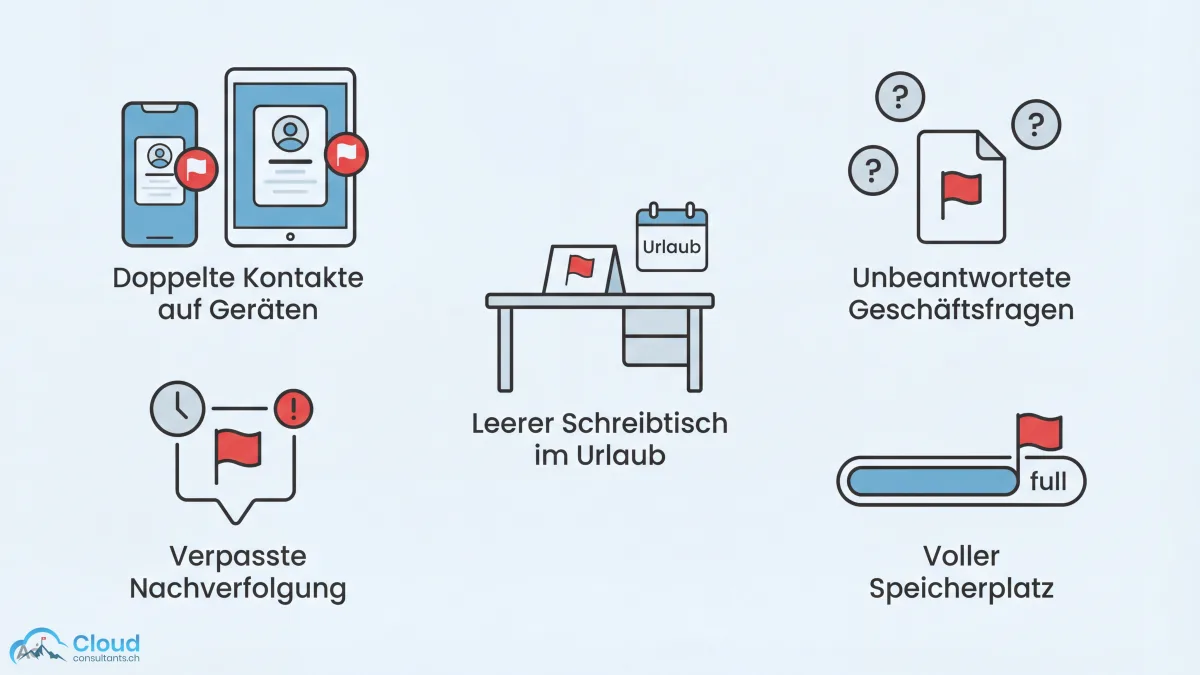
Not every company needs a CRM today. But these five warning signs say your current contact management has hit its limits:
1. Contacts live in multiple places
Outlook, Excel, the field rep’s phone, the assistant’s notes — if the same contact data is maintained in more than two places, duplicates and contradictions appear. Who has the most current number? Nobody can say for sure.
2. Follow-ups slip through
A prospect asked for an offer. Three weeks later, you realise nobody followed up. According to McKinsey, employees spend 1.8 hours a day searching for information — time during which opportunities quietly die.
3. Coverage during absences is hard
When someone is sick or on holiday, the team can’t access their contacts and open conversations. Customers call in and nobody knows what was discussed.
4. You delete old contacts to make room
With Excel or free tools, you hit capacity limits. Instead of reactivating old contacts, they get deleted — and so does their latent value.
5. You can’t answer simple questions
“How many open offers do we have?” — “Which customer was last in touch?” — “How many new contacts did we get this month?” If you can’t answer these in 30 seconds, you’re missing a system.
The switch: from Excel to CRM in 4 steps
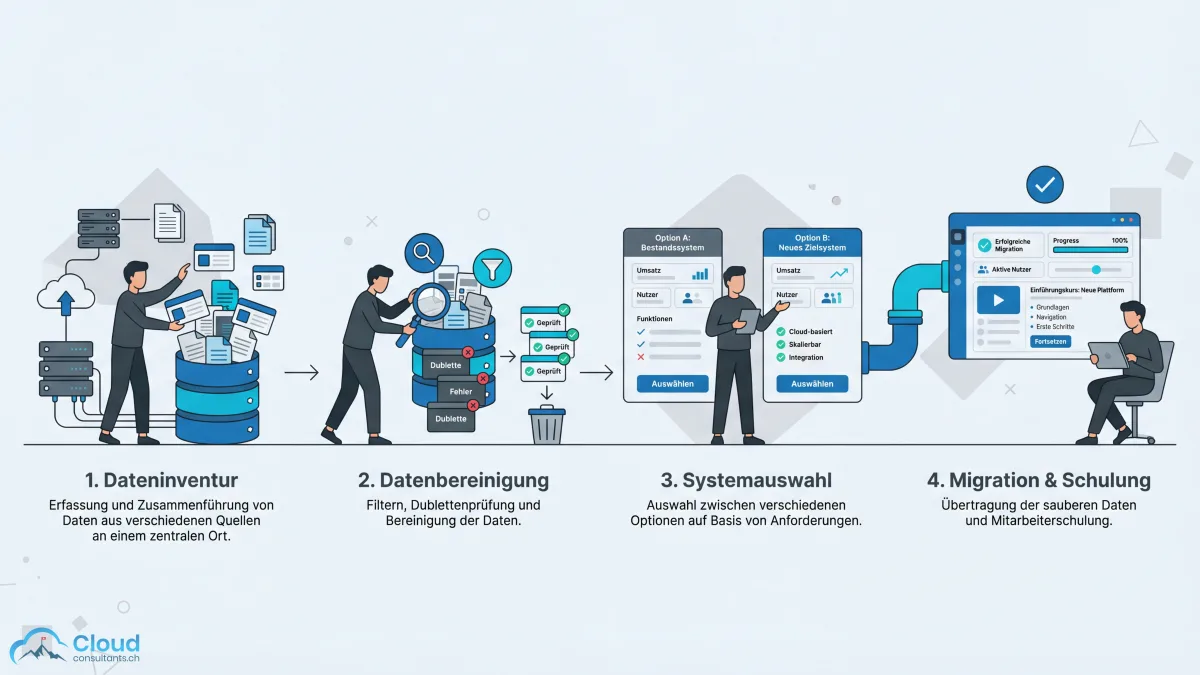
If the warning signs feel familiar, the next step is manageable:
Step 1 — Inventory: gather all contact sources (Excel, Outlook, phone, notebook). Decide which data fields you actually need: name, company, email, phone, last interaction, status.
Step 2 — Clean up: remove duplicates and stale entries. This is the most laborious step — but it decides the quality of your new system.
Step 3 — Pick a system: for the entry point, a free CRM often works (German article). If you’re thinking long-term, start directly with a scalable system like Salesforce Starter Suite from $25/user/month.
Step 4 — Migrate and train: import the cleaned data, set up the basic configuration, and train your team. With outside CRM consulting (German article), this takes 2–4 weeks. Doing it yourself, plan for 4–8 weeks.
Contact management and data protection in Switzerland
If you manage business contacts, you process personal data. Since the revised Swiss Federal Act on Data Protection (revFADP, September 2023), the rules are stricter:
- Purpose limitation: contact data may only be used for the purpose for which it was collected
- Right to information: any person can ask what data you store about them
- Deletion obligation: data that is no longer needed must be deleted
A professional CRM supports these requirements with access controls, audit trails, and automated deletion windows — features that Excel and Outlook don’t offer.
Frequently asked questions
What's the best way to manage business contacts?
For a single person, Outlook or Google Contacts is enough. From 2–3 people on, you need a shared system — either a structured spreadsheet or a CRM. From 100+ contacts and multiple stakeholders per company, a CRM that connects contacts, communication, and opportunities automatically is the right call.
When does a CRM start to make more sense than Excel?
As soon as more than one person needs the same contact data, you start forgetting follow-ups, or contacts are stored in multiple places. In practice, that hits most SMBs at 50–100 active business contacts. A CRM starts at $0 (HubSpot Free) up to $25/user (Salesforce Starter).
How fast do business contacts go stale?
According to Dun & Bradstreet, 22.5 percent of all B2B contact data goes stale every year. That means: after two years, nearly half of your contact database is out of date — through job changes, new phone numbers, or new email addresses. Without regular maintenance, every database turns into a liability.
What's the difference between contact management and CRM?
Contact management stores names, addresses, and phone numbers — like a digital address book. A CRM connects that data to communication history, opportunities, tasks, and automations. So a CRM is contact management plus revenue ops plus reporting.
Which contact-management tools are free?
Google Contacts, Outlook Contacts, and Apple Contacts are free for individuals. For teams, HubSpot Free CRM (2 users, 1,000 contacts), Zoho CRM Free (3 users, 5,000 records), and Bitrix24 Free (unlimited users) offer free starter plans with contact management and basic CRM features.